

NameSilo

ParkingCrew Domains resolving to Chrome Warning

SpaceshipSpaceship
Watch

marly

Established Member
Impact
13
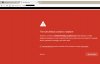
My domains are showing Chrome warning of malware and not resolving properly. I suggest everyone check their names parked with parking crew. This happens in Chrome Browser.
 

Attachments

  • chrome.jpg
    chrome.jpg
    84.1 KB · Views: 396
5
•••
The views expressed on this page by users and staff are their own, not those of NamePros.
Unstoppable Domains โ€” AI StorefrontUnstoppable Domains โ€” AI Storefront
Dear iAchilles,

thanks a lot for your message. Looks like the particular domain falsely got reclassified as adult by our upstream feed provider. You can set reclassification requests via the interface in such cases.

Thanks a lot
ParkingCrew Support
 
1
•••
Why I was closing my account and did not received my winnings
 
0
•••
are pc parked pages viewing correctly on mobile devices? I'm getting some weird all over the place ads and a hard to see forsale banner at the bottom and not on top.. like on desktop page..
 
1
•••
This is happening again. I checked one of my domains and it says:


Your connection is not private

Attackers might be trying to steal your information fromwww.mydomaincontact.com (for example, passwords, messages, or credit cards). Learn more

NET::ERR_CERT_DATE_INVALID
This server could not prove that it is www.mydomaincontact.com; its security certificate expired yesterday. This may be caused by a misconfiguration or an attacker intercepting your connection. Your computer's clock is currently set to Sunday, November 26, 2017. Does that look right? If not, you should correct your system's clock and then refresh this page.

Proceed to www.mydomaincontact.com (unsafe)
 
0
•••
This is happening again. I checked one of my domains and it says:


Your connection is not private

Attackers might be trying to steal your information fromwww.mydomaincontact.com (for example, passwords, messages, or credit cards). Learn more

NET::ERR_CERT_DATE_INVALID
This server could not prove that it is www.mydomaincontact.com; its security certificate expired yesterday. This may be caused by a misconfiguration or an attacker intercepting your connection. Your computer's clock is currently set to Sunday, November 26, 2017. Does that look right? If not, you should correct your system's clock and then refresh this page.

Proceed to www.mydomaincontact.com (unsafe)

Isn't that a generic message when visiting any non-https site?
Since all parked domains are non-https, it should be normal that you get that message.

Please correct me if I'm wrong
 
0
•••
Isn't that a generic message when visiting any non-https site?
Since all parked domains are non-https, it should be normal that you get that message.

Please correct me if I'm wrong

It says security certificate expired.
 
1
•••
0
•••
1
•••
Over 5 years later and this same issue is ongoing, hard to believe... I don't know how long this has been going on as I caught it only a week ago, 11 of my domains out of 75 were redirected to malicious web sites as defined by anti-virus software, Using Fabulous servers resolving at Parking crew. thinking it might be a DNS hack, I opened a Fabulous ticket and they concluded there was no DNS hack and that the redirects on your end are sensitive to anti-virus software, but it doesn't stop there, Google defined the sites as malicious as well and blacklisted all of the 11 domain names that redirected to other sites, and I've been spending sleepless nights cleaning up your mess.

Soon I'll be changing to another park provider, one where my domains wont be blacklisted! ๐Ÿคฌ
 
0
•••
@RaiderGirl ,
are you sure that's not tier2 feeds in action?
I just visited a couple of my domains parked at PC and they resolved normally. I believe that, If there was a problem, it would apply on all domains and not only on some.
 
0
•••
Only 11 domain redirected, I checked each one individually

I have not ruled out a DNS hack on PC's end, my anti virus went off on 4 different computers and my apple phone.
 
Last edited:
0
•••
@RaiderGirl ,
sorry for repeating myself but you didn't really answer the question.
The domains that get redirected might use tier2 feeds which cause the alerts you mentioned. It is quite common for t2 feeds to be shown as malware by some AVs.

Try to disable the 'direct advertisers' button on those domains and see what happens.
 
0
•••
@RaiderGirl ,
sorry for repeating myself but you didn't really answer the question.
The domains that get redirected might use tier2 feeds which cause the alerts you mentioned. It is quite common for t2 feeds to be shown as malware by some AVs.

Try to disable the 'direct advertisers' button on those domains and see what happens.
I changed the DNS on the effected domains and I have no plans on changing it back..

Why should I or any other PC user have to disable the advertisers button? if it's triggering AV's and Google is blacklisting the domains as a direct result, why is PC using tier 2 feeds that trigger it? I was planning to contact them to look into it, but after reading this thread and seeing this issue dates back 5 years, there is no point in it, better to find a secure parking service instead.
 
0
•••
Dynadot โ€” .com TransferDynadot โ€” .com Transfer
Spaceship
Domain Recover
CatchDoms
DomainEasy โ€” Live Options
  • The sidebar remains visible by scrolling at a speed relative to the pageโ€™s height.
Back



