

Dynadot โ€” .com Registration $8.99

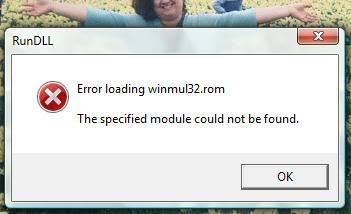
What is winmul32.rom?

Spaceship Spaceship
Watch

xarzu

Established Member
Impact
0
whatisthis.jpg

I get this when first start up my computer.
Any ideas what causes this?

In Vista, what is the name if the routine that shows what apps are started up at boot time?

Also, is there some way to grep your system for this function call and see what calls it? I tried to find a few but none were any good.

And one more thing. My computer is running way slower than it used to. I saw on TV some way to do a check on the system and see how to speed up the performance.
 
0
•••
The views expressed on this page by users and staff are their own, not those of NamePros.
.US domains.US domains
.ROM is not a valid extension to run on Windows.
It is a MSX ROM image used especially for emulator or BIOS flasher.
ROM image are flashed into your system and cannot be overwritten directly.

Your ROM image might have corrupted due to some power failure or viruses.
I think you should try updating your BIOS image file.... Download the correct version of BIOS and update it.

Good Luck!
 
0
•••
never heard..try to google it..
 
0
•••
To stop that process, go to:

Start -> RUN -> msconfig

Then go under the start up tab and stop any process that you don't know what they are - the .rom should be listed in there somewhere, and just untick it, and you should be good to go. I would also attempt a system restore if at all possible, and a few anti vurs scans. I know morph had posted the key to get AVG full until 2018 - check it out here. All the best on fixing this problem mate :)

 
0
•••
Jacob Nicholson said:
To stop that process, go to:

Start -> RUN -> msconfig

Then go under the start up tab and stop any process that you don't know what they are - the .rom should be listed in there somewhere, and just untick it, and you should be good to go. I would also attempt a system restore if at all possible, and a few anti vurs scans. I know morph had posted the key to get AVG full until 2018 - check it out here. All the best on fixing this problem mate :)

Hi,

.Rom process are not listed in msconfig.
Msconfig only list the startup process which are executables and are run after the windows is loaded. .ROM cannot be executed in Windows.
So I think this process cannot be stopped by msconfig as it will not be listed there.

.ROM extension are used for the process for loading Boot Image like Bios file, Motherboard image and ROM image file.

THis may occur due to corrupted ROM image or BIOS rom file. Else, it may be the fake warning due to some threats.
So I think you have to update your BIOS or seek help from manufacturers.
Best!
-James
 
0
•••
Appraise.net
Unstoppable Domains
Domain Recover
DomainEasy โ€” Live Options
  • The sidebar remains visible by scrolling at a speed relative to the pageโ€™s height.
Back



