Unstoppable Domains โ€” AI Assistant

Spaceship.com - Marketplace Thread

SpaceshipSpaceship
Watch

DomainRecap

Top Member
Impact
9,759
Spaceship.com recently launched a new Marketplace section, and as NamePros has given me the go-head, I think the company deserves its own thread for NP domain marketplace users to converse in.

https://www.spaceship.com/sellerhub/

Personally speaking, I will be setting up a new Spaceship.com account this weekend and going to work investigating its various features, options and policies.
 
Last edited:
24
•••
The views expressed on this page by users and staff are their own, not those of NamePros.
GoDaddyGoDaddy
Hi @Marina Savina ,

In fact, we can add records to our non-Spaceship domains listed on Seller Hub, provided we have pointed our NS to Spaceship. That's great, in my opinion!

We can do it by going to Launchpad, selecting Advanced DNS, and there we will find all domains pointing to NS, both those which were registered with Spaceship and the external ones as well.

And we definitely can add custom records in bulk there, @URL Stream . You just check the boxes next to the domains, and then proceed with the Bulk actions menu, which includes adding custom DNS records.

Thank you for the clarification.

My confusion stemmed from the fact that when selecting all domains, the bulk action menu appears without offering a verification option. In contrast, selecting a single domain does prompt for verification, which led me to assume that each domain requires individual TXT verification.

Again, I appreciate your response.

Bulk options:
1753827699637.png


Single click option:
1753827806130.png
 
2
•••
Thank you for the clarification.

My confusion stemmed from the fact that when selecting all domains, the bulk action menu appears without offering a verification option. In contrast, selecting a single domain does prompt for verification, which led me to assume that each domain requires individual TXT verification.

Again, I appreciate your response.

Bulk options:
Show attachment 279934

Single click option:
Show attachment 279935
Aha, got it, thanks for the details. Yep, the bulk verification guide is in progress, however you ัan open any domain and copy TXT record. It will be applicable to all domains. Once added on the side of your provider, you can use "Verify domains ownership" button in Domains tab to verify all of them in one go.

Screenshot 2025-07-30 at 12.33.06.png
 
3
•••
Thank you for the clarification.

My confusion stemmed from the fact that when selecting all domains, the bulk action menu appears without offering a verification option. In contrast, selecting a single domain does prompt for verification, which led me to assume that each domain requires individual TXT verification.

Again, I appreciate your response.

Bulk options:
Show attachment 279934

Single click option:
Show attachment 279935
HI again, @URL Stream ,

Thanks for your detailed reply. Sorry about my misunderstanding.

What I was referring to is the possibility of Bulk adding custom records to external domains listed on Seller Hub, which I use to verify ownership of those domains in order to list them on other Marketplaces, like Atom, for example. I haven't tried yet, but I guess one can add other custom records there, like MX, too. This is a very useful resource, imo.

This option can be found under "Advanced DNS". (Edit: I removed the screenshot).
 
Last edited:
2
•••
Hi @Marina Savina

Since yesterday, SellerHub CSV uploads have been failing, and the issue is dragging on longer than usual.

SellerHub CSV Upload Failure.png
 
Last edited:
1
•••
1
•••
You need to increase the lander SEO visibility to be indexed easier/faster similar to some other landers in the market, and please correct the way domain lander shown is google results when its indexed !

* As below first screenshot a competitor lander indexed and showing clearly that the domain name so and so is far sale !

* As below second screenshot with spaceship lander at google results it shows "for Sale Page" !!!


Instead of " For Sale Page '' , The proper way should be '' The domain ******.com is for sale''

@Marina Savina

1754040685428.png


----------------------------------------

** Showing only "for sale page" !!!


1754041332145.png


.
 
Last edited:
5
•••
Thanks for reporting. Do you still experience it? We haven't had any global issues, thus if you can share an example of the file with me via DM that will be very helpful.
Thanks Marina. It's working today. Will report when I'm experiencing this again.
 
2
•••
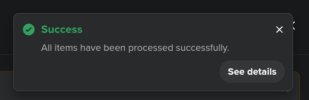
Although these are more of Ui and UX issues, two things require attention (see attached screenshots):

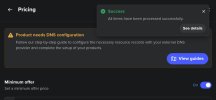
1. While the successful import/upload message is useful as an initial notifier, it becomes visual clutter and unnecessary friction when multiple domains are successfully imported/uploaded, since they don't disappear unless closed. For example, my third screenshot shows the pop up still showing on the pricing page after a domain has been successfully imported.

There should be a message briefly showing the domain(s) imported/uploaded before disappearing. Any tracking for reference purposes should be found on a dashboard (and this is where I will harken back to Dan as they did this well without the need for a 'successful import/upload' pop up following a user around wherever they clicked).


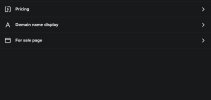
2. After importing a domain, the following steps are taken to add a price (Buy it now / minimum offer):
- click the pricing link/button
- on the next page, enter the sale price
- click on 'Save'
- either click the x symbol in the top right hand corner, or the arrow on the far left hand side to return to the page in my screenshot
- click on 'For sale page'
- check to see if the sale page is activated
- click on 'Save' if the sale page is not activated

When added up, these steps are a back-and-forth between pages just to set up a domain, even when it has been imported in the correct format of: Domainname.com,5000,5000,on

The previous Ui layout was more akin to having everything/most functions completed on one page.

It would be helpful if pricing could be updated and saved as an expandable/drop-down feature on the same page under the 'Pricing' heading, since a domain's sale page is only activated when the 'Buy it now' or 'Minimum offer' fields are filled in.

Thanks
 

Attachments

  • Successful_import_popup.jpg
    Successful_import_popup.jpg
    16.9 KB · Views: 32
  • SpaceshipUi-back-and-forth.jpg
    SpaceshipUi-back-and-forth.jpg
    28.6 KB · Views: 38
  • PopUp_on_pricing_page.jpg
    PopUp_on_pricing_page.jpg
    69.4 KB · Views: 34
Last edited:
4
•••
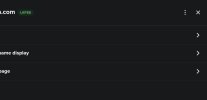
Also, once all updates are done, I have to click the x to return to the seller hub where my domains are (I'm guessing this is a Spaceship way to close pages, even though they are not the same as pop up windows).

As my attachment suggests, where is the button / link for me to return to the seller hub?

If I didn't know any better, I'd have to think a bit (shouldn't have to with good Ui) before deciding to click on the x. Otherwise, I'm in a page with no clear way out, other than to press the x or back button on my keypad.
 

Attachments

  • WheresTheSellerHubButton.jpg
    WheresTheSellerHubButton.jpg
    21.5 KB · Views: 25
2
•••
You need to increase the lander SEO visibility to be indexed easier/faster similar to some other landers in the market, and please correct the way domain lander shown is google results when its indexed !

* As below first screenshot a competitor lander indexed and showing clearly that the domain name so and so is far sale !

* As below second screenshot with spaceship lander at google results it shows "for Sale Page" !!!


Instead of " For Sale Page '' , The proper way should be '' The domain ******.com is for sale''

@Marina Savina

Show attachment 280142

----------------------------------------

** Showing only "for sale page" !!!


Show attachment 280143

.
Thanks for the suggestion, we will look into it.
 
2
•••
Also, once all updates are done, I have to click the x to return to the seller hub where my domains are (I'm guessing this is a Spaceship way to close pages, even though they are not the same as pop up windows).

As my attachment suggests, where is the button / link for me to return to the seller hub?

If I didn't know any better, I'd have to think a bit (shouldn't have to with good Ui) before deciding to click on the x. Otherwise, I'm in a page with no clear way out, other than to press the x or back button on my keypad.
Thanks for both reports. I have passed to our UX team for review.
 
1
•••
Thanks for the suggestion. This is already planned and will be picked up by the team in the nearest time, so stay tuned. If you would like us to also have a look at the missing domain reason, please PM your username or account ID to me.
This feature is very necessary, and my account also has a large number of domain names. For example, I have 10000 domain names. Without deleting the domain names, suddenly the number of domain names in my account becomes 9999. I hope to be told which domain name was deleted? Sedo has this feature that can display a list of domain names that have been deleted at all times since the account was created. You can refer to Sedo's feature for more information

Another feature is that if I want to publish 50 domains in bulk, but there may already be 20 domains listed in my account among these 50 domains, after I publish, I hope to display which domains have been added and which ones already exist in my account. Dan had this feature before, you can also refer to it.
 
1
•••
Hi, this is not convenient if I have a list of domains. I'd like to simply paste these domain into a search field, and take actions on that subset of domains.
This is a very useful feature, similar to the search for 'afternic'. I can clearly know which domains are already listed for sale in my account and which domains I have not yet listed
 
Last edited:

2
•••
@Marina Savina

When I search for domain names on Namecheap, I find that buyers are required to redirect to the spaceship website to complete the purchase, which is very bad because buyers do not trust spaceship and may not make the payment for the purchase. The best way is for the buyer to add the domain name to the namecheap shopping cart and complete the transaction on namecheap, without jumping to spaceship
 
9
•••
@Marina Savina

When I search for domain names on Namecheap, I find that buyers are required to redirect to the spaceship website to complete the purchase, which is very bad because buyers do not trust spaceship and may not make the payment for the purchase. The best way is for the buyer to add the domain name to the namecheap shopping cart and complete the transaction on namecheap, without jumping to spaceship
Based on this, I will remove all spaceship domain names.

When will the seller publish the domain name on Spaceship, and the buyer can search for it on Namecheap and directly add it to the Namecheap purchase car, then I will list the domain name again.

most people don't willing to pay a large amount of money to purchase a domain name from a new unknown registrar, Spaceship. If small amount domain buyers may be willing to pay on spaceship
 
Last edited:
4
•••
@Marina Savina - Did you happen to find out if the Spaceship folks would be willing to give us the option of saying "Start a Conversation" instead of "Make an Offer"? (again, an option for those who wish to use it, not mandatory for all). If so, were they open to the idea?
 
3
•••
Based on this, I will remove all spaceship domain names.

When will the seller publish the domain name on Spaceship, and the buyer can search for it on Namecheap and directly add it to the Namecheap purchase car, then I will list the domain name again.

most people don't willing to pay a large amount of money to purchase a domain name from a new unknown registrar, Spaceship. If small amount domain buyers may be willing to pay on spaceship
But Spaceship and Namecheap are siblings, and everyone knows that, as it's not a secret piece of information, so, honestly, I don't get your concern.
 
0
•••
But Spaceship and Namecheap are siblings, and everyone knows that, as it's not a secret piece of information, so, honestly, I don't get your concern.

Random buyers don't know that. The search checkout popup should say something about being a "trusted partner" or "sister registrar" to Namecheap or something like that to gain trust. Right now a buyer searching Namecheap only sees a checkout link to a new website they never heard of. A lot of people (especially Namecheap users) are privacy focused and won't want to create new accounts especially at a place they have never heard of. Lost sales.
 
2
•••
4
•••
Random buyers don't know that. The search checkout popup should say something about being a "trusted partner" or "sister registrar" to Namecheap or something like that to gain trust. Right now a buyer searching Namecheap only sees a checkout link to a new website they never heard of. A lot of people (especially Namecheap users) are privacy focused and won't want to create new accounts especially at a place they have never heard of. Lost sales.

That's right!

Based on this, I will remove all spaceship domain names.

When will the seller publish the domain name on Spaceship, and the buyer can search for it on Namecheap and directly add it to the Namecheap purchase car, then I will list the domain name again.

most people don't willing to pay a large amount of money to purchase a domain name from a new unknown registrar, Spaceship. If small amount domain buyers may be willing to pay on spaceship

That's right! Customers who come with Namecheap must purchase the domain name with Namecheap.
 
1
•••
Appraise.net
Spaceship
Domain Recover
DomainEasy โ€” Live Options
  • The sidebar remains visible by scrolling at a speed relative to the pageโ€™s height.
Back