Alright... here is a simple step-by-step instruction from me. I use this to integrate paypal buttons on my website:
1) You need a business account with Paypal in order to use buttons on your website for accepting payments.
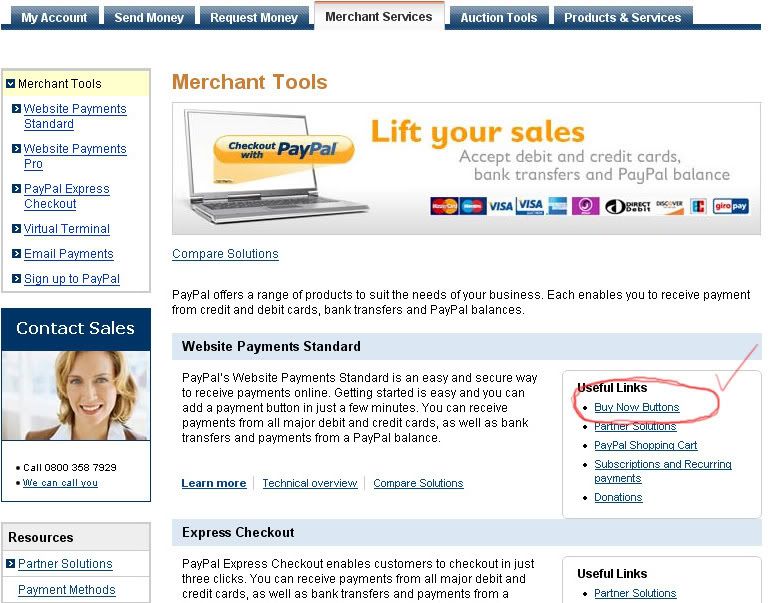
Once you have logged into your paypal account, you need to navigate to the Merchant Services available in the top bar on the site. You will see several other options including "My Account", "Send Money", "Request Money" etc. After that is the one you need to click on: "Merchant Services"
Refer to the screenshot to see what I mean. Then look on the page for the link that states: "Buy Now Button". Please click on the link.
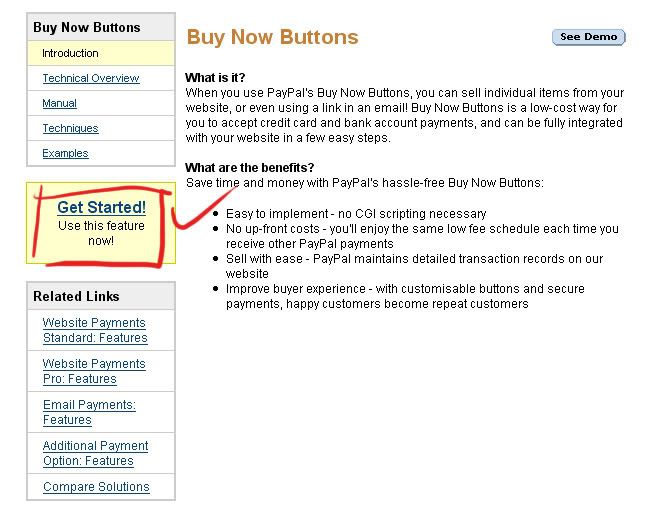
On this page please look to your left and you will see a yellow box that states: "Get Started- Use this Feature now"
Please click on that link.
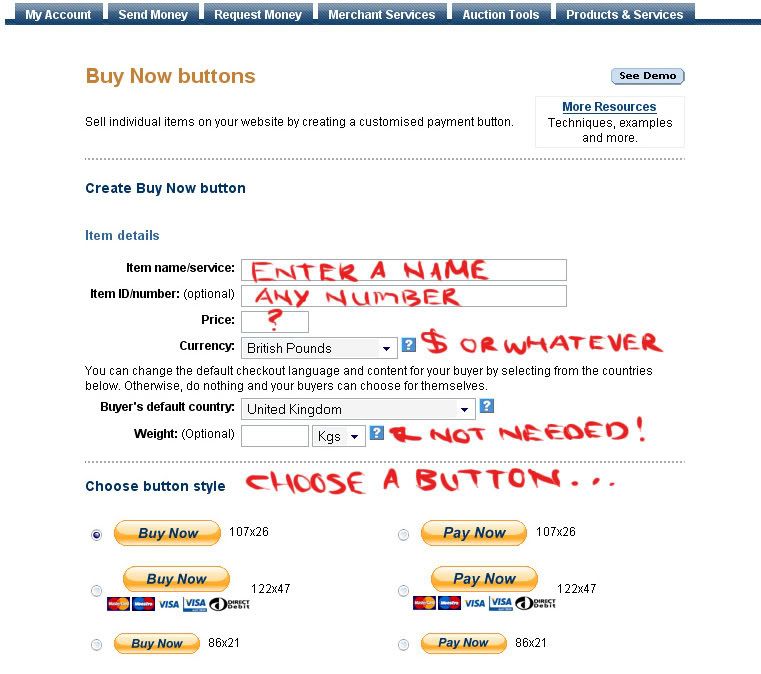
Now you will be on the page that is important. Here you will enter the details for your ebook.
Insert the name of your ebook in the appropriate field and enter a number (optional) if you feel that you will be selling more than one ebook. This is just a neat little feature to help you keep track of things. However you do not need to enter a number if you are only selling one product. Next enter the price. I live in the UK, so for me I would for example charge £15.00 for a download. If you live in the US then just use the drop down list to navigate to your chosen country and currency. Enter 15.00 or 10.00 - whatever you feel like. You do not need to enter any weight since it isn't a physical product.
Next choose a button that appeals to you. You can customize the buttons so play around with it.
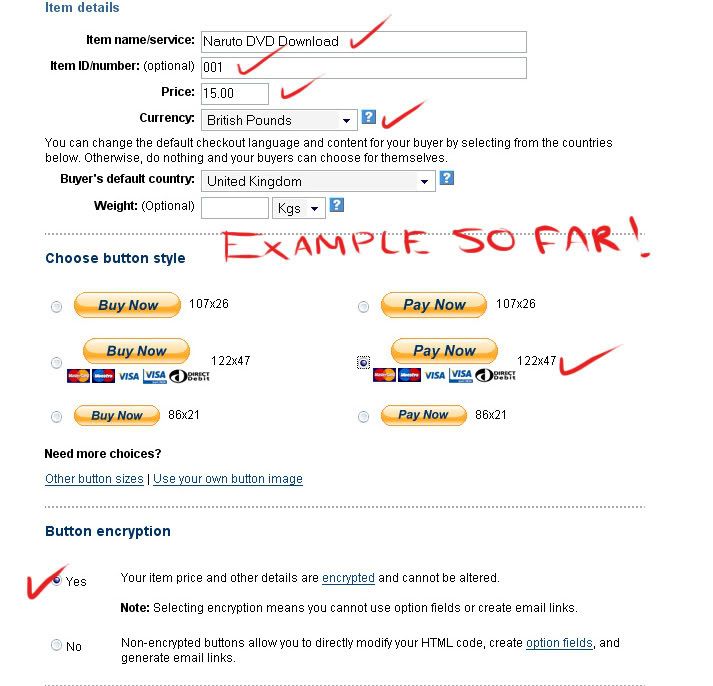
Here is an example with details entered:
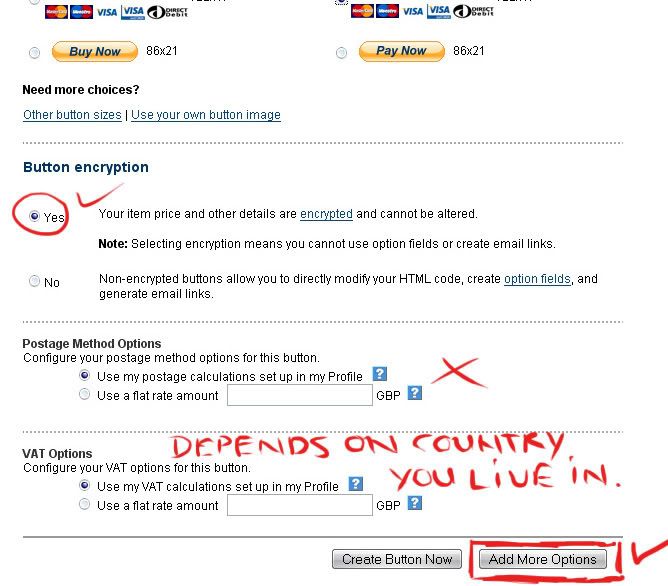
Next up, please choose "Yes" for button encryption. Or else someone can alter the values for your ebook.
Do not enter any postage method options. Since you are not physically sending it to someone.
Now for VAT options...that is depended on the country where you reside.
After you have edited what you needed, please click on the button that states: "Add More Options"
Now you will be on the second most important page of creating your button.
This is essential for the delivery of your ebook from your website to your customer's hard drive.
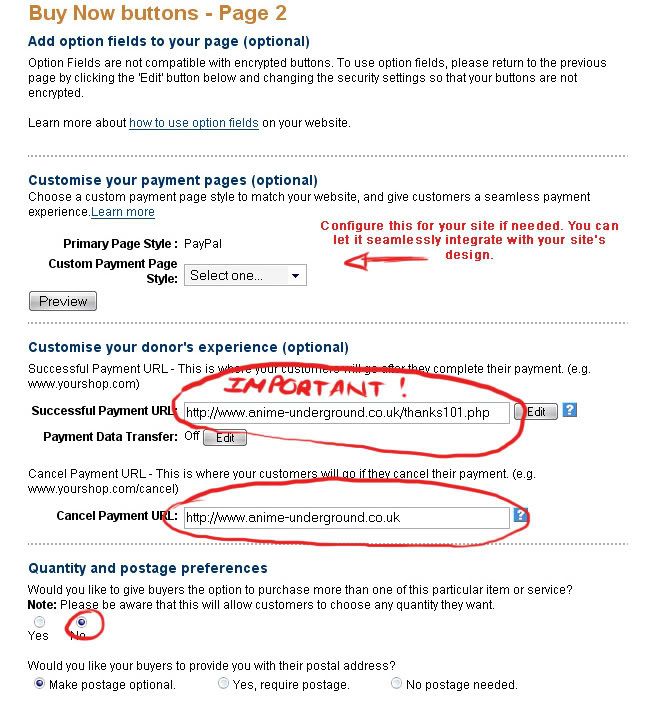
Here you can customise your payment pages. This is entirely up to you if you want to play around with the settings. I normally do nothing here, if I am just adding it to my website on a normal white background page. However if your site's background is different colors and you want it to look nice and fit in, then please adjust the settings here to your liking.
Next you customise your donor's experience. Now here is what essentially is happening. Customer A navigates to your page and sees the ebook graphic and the sales letter. He reads through to the end and sees the Paypal Button. He clicks on it. He is directed to the paypal site where the customer inserts his own paypal login and password. Once he is logged in he is presented with a page that will detail the amount of money he needs to pay for the ebook. And any other details will be outlined on the page for him. At the bottom of the page, it asks him if he wants to pay the amount and he clicks on the button to say "Yes". The customer receives an overview of the transaction afterwards with the details and his unique transaction number.
**If you have entered the correct details in the Customisation of your donor's Experience, then he will be redirected to a page on your website where he can then download the ebook. This is an automated process and really easy.
So in the field of "Successful Payment Url" please enter the page url where the customer can download the ebook. In the following screenshot you can see an example of what I mean. The same with "Cancel Payment Url". Just enter your domain name if the customer intends to cancel the transaction. Ex:
http://www.yourname.com
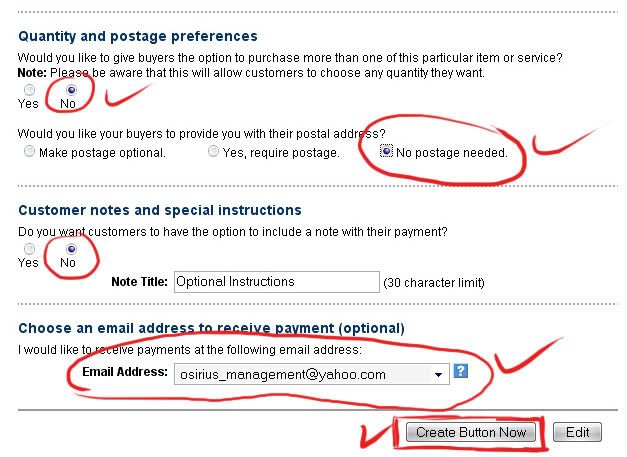
Quantity and Postage Preferences: Here you click "No" and in the next section you can choose any option. It depends if you want to build a list and want more information than just someone's name and email address. You can specify that they must provide you with their postal address. But in most cases it is unnecessary.
Customer Notes and Special Instructions: Click "no" unless you are offering some sort of extra service and require feedback or need a specific code for your own reference.
Next choose the email address where you will receive payment to.
So enter your paypal email address and the very last thing you do is click on:
"Create Button Now"
That's it. You have done it!
The final step is up to you. You take the html provided to you (Copy and paste it) and then navigate to your site page and insert the html where you want the button to appear.
If you have any further questions, please do not hesitate to ask me via pm.
Thanks.




 But it is good way if you don't want to be taken for a ride by fraud payments and all.