Dynadot .com transfer sale, only $10.12 with coupon code DYNA12, available while supplies last, ends October 31, 2026.

status-resolved Formatting buttons are not working when making a new post (Editor)

Namecheap AuctionsNamecheap Auctions
SpaceshipSpaceship
SpaceshipSpaceship
Watch

alcy

check signatureTop Member
Impact
45,477
I do not get it
when i post
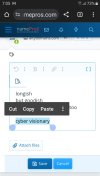
in editor none of formatting options like undo or bold etc never light up

why????
 

Attachments

  • Screenshot_20250622-070506_Chrome.jpg
    Screenshot_20250622-070506_Chrome.jpg
    181.4 KB · Views: 57
1
Close
The views expressed on this page by users and staff are their own, not those of NamePros.
GoDaddyGoDaddy
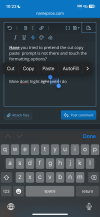
Have you tried to pretend the cut copy paste prompt is not there and touch the formatting options?


Mine dont hight.light until i do

IMG_3955.png
 
0
Close
Upvote 0
Have you tried to pretend the cut copy paste prompt is not there and touch the formatting options?


Mine dont hight.light until i do

Show attachment 277587

I tried by highlighting and also not

its always greyed out

months ago it worked. I highlighted text and b for bold turned on. and worked
 
1
Close
Upvote 0
@alcy try the [ ] sign to switch mode. Does it work then?
 
Last edited:
2
Close
Upvote 0
I do not get it
when i post
in editor none of formatting options like undo or bold etc never light up

why????
You're in "code" mode; press the button with brackets on the top right of the editor to switch back:

1750628651964.png
 
2
Close
Upvote 0
Solution
1
Close
Upvote 0
yep got it
tho I gotta say ita hard to figure out. I never would if not ask here
Glad that you got it working again.

This is a common issue that we've had others ask us about, so we've moved the [ ] icon to make it more difficult to press by accident:

Now it's hidden behind the three vertical dots:

Screenshot 2025-06-25 at 1.58.52 PM.png


We hope this will help avoid accidental clicks/taps on it.
 
1
Close
Upvote 0
1
Close
Upvote 0
2
Close
Upvote 1
2
Close
Upvote 0
This is now under the three vertical dots next to the save button:
I discovered this when I had to go searching when I posted the last NamePros Blog article. I always write them entirely in code, then upload and fine edit only at end. When I went to post last one and no way to switch to BB mode I panicked.O_o But assumed there must still be a way, and searched until I found it under the dots. :xf.smile: I found this discussion post after I had figured it out myself.

Does NamePros have one place just to announce things like this - user interface changes, maybe rule changes, etc.?

-Bob
 
3
Close
Upvote 0
Does NamePros have one place just to announce things like this - user interface changes, maybe rule changes, etc.?
Not yet, but that's a great idea. :)
 
2
Close
Upvote 0
When I went to post last one and no way to switch to BB mode I panicked.O_o
I'm so sorry you had to go through that.

I'm here if you need anything.
 
Last edited:
2
Close
Upvote 0
I'm so sorry you had to go through that. I'm here if you need anything.
:ROFL: Thanks but it's ok. I always have my therapist on speed dial for situations like this.
 
2
Close
Upvote 0
I always have my therapist on speed dial for situations like this.
"Here we go again: NamePros edition. What's playing on your emotional dashboard right now, Robert?"
 
Last edited:
0
Close
Upvote 0
2
Close
Upvote 0
2
Close
Upvote 0
DomainEasy: flexible LTO options. Close more domain deals with financing.

We're social

Escrow.com
Spaceship
Domain Recover
CryptoExchange.com

NamePros updates

Quick replies: search, your most used replies, and more on every post
Quick replies are easier to find and use now. The quick reply menu has a search box. Type a few letters to find the reply you want. A...
AIVikings
Catchy
  • The sidebar remains visible by scrolling at a speed relative to the page’s height.
Back