discuss Essential domaining tool - Microsoft Excel

SpaceshipSpaceship
SpaceshipSpaceship
SpaceshipSpaceship
Watch
Impact
1,887
One of the most useful tools that I have found in my domaining engagement is Microsoft excel. I use it for the following purposes:

1) Managing my portfolio - Names I own, expiry, bought day, renewal date, registrar, renewal price, hold time so far and so on
2) Pricing - Each domain is priced and kept in an excel sheet with a list of all the platforms that it is put up for. This helps in knowing what is priced at what kind of prices.
3) Geo-domaining/hand registration - Whenever buying a geo domain name, you can just use a lost of countries in the column field and keep adding keywords to get a list of all potential domain names and then use Godaddy to check what is available in a category.

What do you use Microsoft Excel for?
If you need a template, do let me know and I will share it with you.
 
0
•••
The views expressed on this page by users and staff are their own, not those of NamePros.
GoDaddyGoDaddy
Yes please can send me the template?
 
0
•••
I use it to manage my portfolio, so I can sort based on expiration, price, etc. It is also helpful for maintaining a count of domains by registrar, % of tld, source where I purchased name, acquisition cost, etc.

I've also used it to add geo or other prefixes to create bulk list to check availability.
 
0
•••
One of the most useful tools that I have found in my domaining engagement is Microsoft excel. I use it for the following purposes:

1) Managing my portfolio - Names I own, expiry, bought day, renewal date, registrar, renewal price, hold time so far and so on
2) Pricing - Each domain is priced and kept in an excel sheet with a list of all the platforms that it is put up for. This helps in knowing what is priced at what kind of prices.
3) Geo-domaining/hand registration - Whenever buying a geo domain name, you can just use a lost of countries in the column field and keep adding keywords to get a list of all potential domain names and then use Godaddy to check what is available in a category.

What do you use Microsoft Excel for?
If you need a template, do let me know and I will share it with you.
I use Google Sheets at this point but would be interested in a copy of your Excel sheet. :)
 
0
•••
Me too... working with Excel for all at this moment with small portfolio.

I think Excel is Ok if have small portfolio (-1000 domains)but if you have a BIG portfolio with more than +5000 domains in the same sheet any filter or search starts to slow down quite a bit.

@abstractdomainer how many domains do you handle in excel?

I use Google Sheets at this point but would be interested in a copy of your Excel sheet. :)
You feel Google Sheets more fluid than Excel File in PC to big portfolio?
 
0
•••
Me too... working with Excel for all at this moment with small portfolio.

I think Excel is Ok if have small portfolio (-1000 domains)but if you have a BIG portfolio with more than +5000 domains in the same sheet any filter or search starts to slow down quite a bit.

@abstractdomainer how many domains do you handle in excel?


You feel Google Sheets more fluid than Excel File in PC to big portfolio?
I just happened to start out with Google Sheets and never tried using Excel.
 
1
•••
All - Sharing it here.
There are 3 tabs :

1) Keeping a track of your domain name
2) Where is it listed and at what price
3) Geo domain names - Just add keywords on the top, country in the rows and drag.
 

Attachments

  • NP.xlsx
    10.2 KB · Views: 359
0
•••
All - Sharing it here.
There are 3 tabs :

1) Keeping a track of your domain name
2) Where is it listed and at what price
3) Geo domain names - Just add keywords on the top, country in the rows and drag.
Any more views on this?
Can we refine it further to make it more realistic?
 
0
•••
All - Sharing it here.
There are 3 tabs :

1) Keeping a track of your domain name
2) Where is it listed and at what price
3) Geo domain names - Just add keywords on the top, country in the rows and drag.
Did anyone find this useful?
@haythamosman @inforg Do you suggest any changes that we can make to this to make it better?
 
0
•••
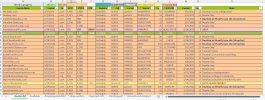
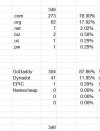
Mine looks like this.
 

Attachments

  • NP2.JPG
    NP2.JPG
    366.2 KB · Views: 301
  • NP1.JPG
    NP1.JPG
    36.3 KB · Views: 270
1
•••
Mine looks like this.
Thanks, this is good!
Everyone who is starting your journey or have already been in domaining, use this as a guide maybe and start tracking your names.
 
0
•••
Still building my portfolio and don't see any need for such tool since I'm having only 3 names.
 
0
•••
Still building my portfolio and don't see any need for such tool since I'm having only 3 names.
You will need it when you have 100+ names. Plan for it now itself.
It doesn't take a lot of effort, keep adding as you keep buying.
 
0
•••
I use Dnprobe.com to generate and check available geo domains.
 
0
•••
Last edited:
1
•••
0
•••
2
•••
0
•••
Last edited:
0
•••
0
•••
DomainEasy: flexible LTO options. Close more domain deals with financing.

We're social

Escrow.com
Spaceship
Escrowly
CryptoExchange.com
Domain Recover

NamePros updates

More data. Your data. See what is new
Major update
We have made a number of features available to provide sellers more data for their domains and inquiries, and greater access to the data...
AIVikings
Catchy
  • The sidebar remains visible by scrolling at a speed relative to the page’s height.
Back