advice Creating payment buttons help

SpaceshipSpaceship
SpaceshipSpaceship
SpaceshipSpaceship
Watch

lknights1987

Established Member
Impact
249
Hi all,

I would like to create buy now / lease to own payment buttons on my website domain landing pages. I am using Wordpress/Elementor pro

Can someone please tell me how i can do this? And what payment provider would work best?
 
2
Close
The views expressed on this page by users and staff are their own, not those of NamePros.
GoDaddyGoDaddy
Hi all,

I would like to create buy now / lease to own payment buttons on my website domain landing pages. I am using Wordpress/Elementor pro

Can someone please tell me how i can do this? And what payment provider would work best?
I guess you want payment to external marketplaces?

Use the html widget and insert a link towards your desired sales marketplace.

e.g:

Code:
<a href="(insert link here)">
  <button type="button">Buy domain here</button>
</a>
 
Last edited:
3
Close
2
Close
Hi all,

I would like to create buy now / lease to own payment buttons on my website domain landing pages. I am using Wordpress/Elementor pro
I guess you want payment to external marketplaces?

Use the html widget and insert a link towards your desired sales marketplace.
The original poster has yet to clarify this. Sounds like they are trying to do this independent of the external marketplaces.
Is this so? And, if so, do you still wish to use an escrow company at a minimum? Or is this truly a completely "buy direct" that you wish to provide?
 
0
Close
2
Close
1
Close

WooCommerce + link to external marketplaces​

Step by step
1) Install WooCommerce plugin ( go to the Plugins » Add New » WooCommerce» Install Now» Activate)
install_wocommerce_plugin.png

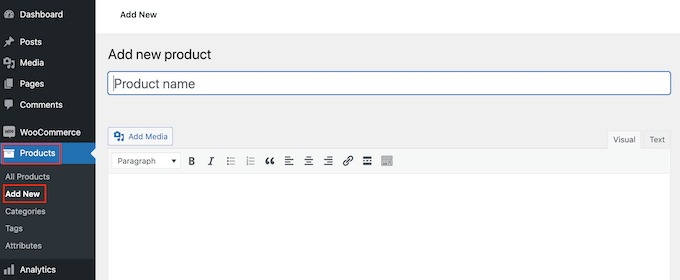
2) Add new Product/Domain ( go to the Products » Add New page ) Here you may type domain name + add text and logo
products-add-new.png

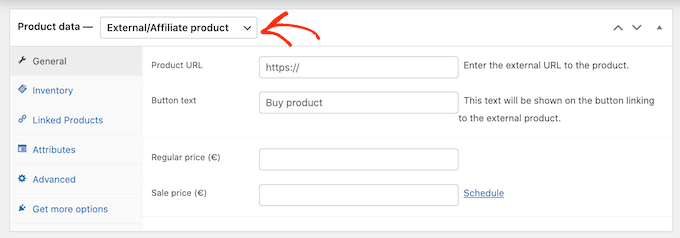
3) Once you’ve done that, scroll to the ‘Product data’ box.

Here, open the dropdown that shows ‘Simple product’ by default and click on ‘External/Affiliate product.’
Product URL, here I used link to external marketplaces checkout like this:
https://dan.com/orders/checkout/nameinbox.com
Setup prices and click ‘Publish.’
external-affiliate-product.png

Now if you visit the shop page of your domain store, you’ll see your Domain live.
 
2
Close
Thanks all for your reply. So currently I am using Wordpress + elementor with buy now buttons that I created redirecting to dan lander once they’re clicked on

Like this

Rapidimport .com

I want to create something like this

Tv .services

But I’m order to do this I need to go to escrow and create over 500 buttons for my domain landing pages

Is there a quicker way of doing this??

Downloading the woocommerce plug-in and Escrow plug-in may not be the answer as I’ll have to create over 500 product pages for this to work + the checkout process seems long winded compared with clicking on an escrow button and filling out details like on my lander TV .services

 
2
Close
Thanks all for your reply. So currently I am using Wordpress + elementor with buy now buttons that I created redirecting to dan lander once they’re clicked on

Like this

Rapidimport .com

I want to create something like this

Tv .services

But I’m order to do this I need to go to escrow and create over 500 buttons for my domain landing pages

Is there a quicker way of doing this??

Downloading the woocommerce plug-in and Escrow plug-in may not be the answer as I’ll have to create over 500 product pages for this to work + the checkout process seems long winded compared with clicking on an escrow button and filling out details like on my lander TV .services
Are you saying that the issue is with having 500 different domains, so each would need a unique Escrow.com (or equivalent) button ? Sounds like perhaps a question worth directing to Escrow.com. They likely deal with customers with large portfolios,and might have an easy solution for this. Please let us know if you find that solution.

Thanks for the great questions.
 
0
Close
Downloading the woocommerce plug-in and Escrow plug-in may not be the answer as I’ll have to create over 500 product pages for this to work + the checkout process seems long winded compared with clicking on an escrow button and filling out details like on my lander TV .services


For Buy it Now button, escrow.com plugin works. no need to create 500 buttons at escrow.com. It's a dynamic plugin. you can check the checkout cart by choosing escrow.com.

I want to create something like this

Tv .services

This can be done very easily by hiring a web developer.
 
Last edited:
3
Close
Appraise.net

We're social

Escrow.com
Spaceship
CryptoExchange.com
Domain Recover

NamePros updates
Quick replies: search, your most used replies, and more on every post
Quick replies are easier to find and use now. The quick reply menu has a search box. Type a few letters to find the reply you want. A...
AIVikings
Catchy
  • The sidebar remains visible by scrolling at a speed relative to the page’s height.
Back